I’ve enjoyed performing and producing music since I was in high school. Back then, I had a lot of time for writing, rehearsal, recording, and performing live. But now as an adult, working as an attorney full time and running the operations of a genetic genealogy company, I find myself having less and less time to create and release new music. Over the past few months, since I began integrating AI into my lifestyle, one of my primary focuses was improving my efficiency as a musician, so I have time to write, record and promote a steady stream of new songs, despite the other aspects of my life competing for my free time. In this article, we’ll explore how I used ChatGPT 4o to streamline the production pipeline for my latest song “Overblown” which is currently at the stage of a demo mix with a storyboard music video, that can be shared with potential collaborators for further steps along the production process that for many of my songs ultimately culminates with an official release coordinated with multiple channels of promotion.
Earliest Stages in the Production Pipeline
In the earliest stages of creating music, inspiration can strike at any moment, often when you’re least prepared to capture it. Before integrating AI into my workflow, I relied on a notebook for jotting down musical ideas—a method that was both cumbersome and disorganized. Not only was it challenging to record these spontaneous bursts of creativity, but organizing and developing them into full-fledged songs was equally daunting.
Thanks to the advancements in AI, my process has undergone a revolutionary change. I developed a comprehensive music vault database with the assistance of ChatGPT, transitioning from my old paper-based methods to a streamlined, paper-free system. This custom database, designed over a week of intensive collaboration with ChatGPT, is hosted on AWS architecture and serves as the central hub for managing all my song ideas, audio tracks, and releases.
Here’s how it works: Whenever inspiration strikes, I simply turn on the video camera on my phone and record my ideas in free-form style. This could be a melody, a lyrical phrase, or a chord progression. Once recorded, I log into my music vault database from my phone and upload the video. If the idea expands on an existing song, I can link it directly to that project. If it’s a new concept, I can create a new entry in seconds, setting the stage for future development.
This system has dramatically simplified how I capture and organize my musical ideas. No longer do I have to deal with scattered files or the impossibility of scribbling notes while driving. Instead, everything is conveniently stored and categorized in one accessible location. The database not only allows me to review and download these ideas from anywhere but also provides login credentials to collaborators, granting them shared access to specific resources, and has screens that assist me in tracking production and release tasks. It basically allows me to run a small record label efficiently.
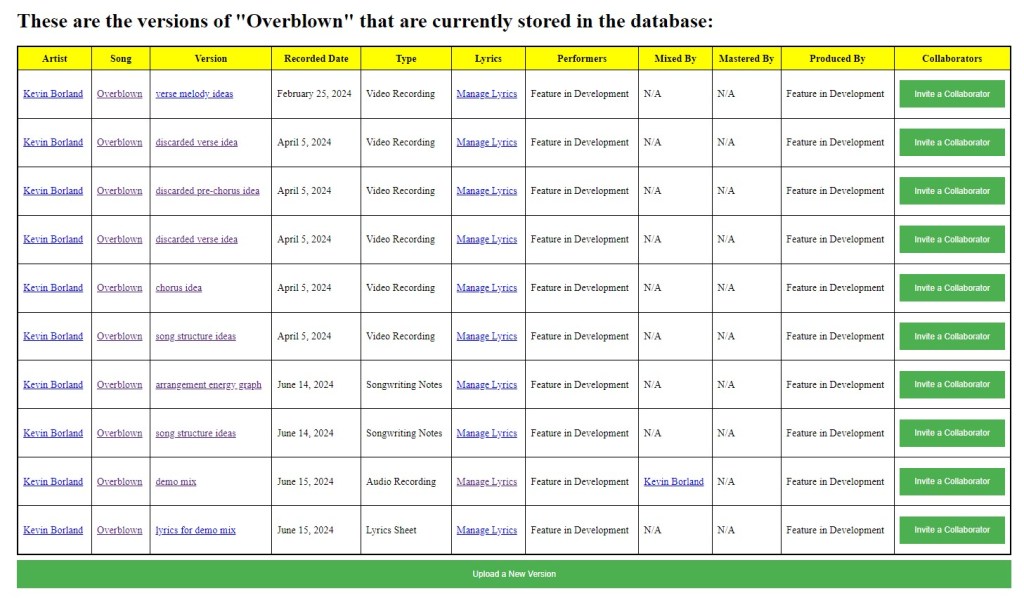
To illustrate, the screenshot below from my music vault shows the “Version Library” for my song “Overblown”. The first six entries represent the initial songwriting stage, capturing six video ideas recorded on February 25 and April 5 earlier this year. These ideas came to me while driving—moments when pulling out a notebook would have been impractical. Although recording a cell-phone video isn’t inherently complex and doesn’t require AI assistance, organizing and managing these videos used to be a significant hurdle. With this new system, everything is neatly stored and ready for the next steps in production.
Prior to AI, developing such an efficient and cohesive system would have been inconceivable for a single person in any reasonable period of time. The music vault not only captures my spontaneous ideas but also ensures they’re easily accessible and organized, making the transition from inspiration to production much smoother. We’ll discuss other aspects of using AI to run a record label, and the process of using AI for software development, in future blog posts, but let’s make this one about the music. In this post, we will focus on my use of ChatGPT over the span of 3 days to transform these 6 music ideas to a “full-band” demo version presented as a storyboard video.
Arriving At the Studio On Friday Afternoon
I have a small recording studio set up in a spare room at my lake house, which allows me to produce music relatively inexpensively. Last Friday, I finished work early and went straight to my studio. The first thing I did was access my music vault database to choose an undeveloped song to work on. With six musical ideas already uploaded, “Overblown” stood out as the obvious choice for this weekend’s project. Based on my current workflow, I was confident that I could turn these ideas into a full demo over the span of three days. One of the greatest advantages of maintaining a music idea vault is that I never run out of inspiration. Whenever I show up at the studio ready to create, there’s always a plethora of songs I can work on.
The first step was to listen to all the recorded ideas again and decide which elements to incorporate into the song and which to discard. I decided to set aside a verse melody from one of the videos because it felt a bit cliché and too reminiscent of a Beatles tune—a likely result of binge-watching Get Back on Disney Plus the night before. I then set up a project file in my digital audio workspace (DAW) and set the tempo to 118 beats per minute, matching the tempo from the video containing ideas for the chorus.
Next, it was time to assemble these parts into a cohesive song structure. This involved more than just lining up segments; it required thoughtful arrangement to ensure the song’s flow and emotional journey. Working with ChatGPT was much like having a conversation with a band member during a rehearsal in the old days (except that the band member is a genius robot so the process took just a few minutes). We discussed not only the overall structure but also the arrangement ideas for each section. Here’s the initial song structure diagram for “Overblown.” While we made significant modifications during the recording process, this diagram represents our starting concept:
Song Structure Chart
| Section | Length | Description |
|---|---|---|
| Intro | 4 bars | Only guitar, setting the mood for the song. |
| Chorus Intro | 8 bars | Bass and drums join in, creating a chorus-like feel but without vocals. |
| Verse 1 | 16 bars | 8 bars with sparse vocals and instrumental responses. 8 bars with added background vocals for dynamic build. |
| Build-Up | 2 bars | Abrupt, instrumental, very bass-heavy transition to the pre-chorus. |
| Pre-Chorus 1 | 6 bars | Energetic build leading into the chorus. |
| Chorus 1 | 8 bars | Full instrumental and vocal energy. |
| Verse 2 | 16 bars | Similar to Verse 1 but with a muted lead guitar hook. Vocal dynamics shift from chest voice to head voice with natural distortion in the second half. |
| Build-Up | 1 bar | Sudden, chill guitar riff, breaking into the lively pre-chorus after just 1 bar. |
| Pre-Chorus 2 | 6 bars | Similar energetic build as Pre-Chorus 1 but following a quieter transition. |
| Chorus 2 | 8 bars | Same energetic chorus as before. |
| Bridge | 8 bars | Quiet, with cymbal pattern and spoken lyrics. Melodically similar to pre-choruses but extended to 8 bars for dynamic build. |
| Instrumental | 8 bars | Intense, instrumental section similar to half-verse, functioning like a solo. |
| Pre-Chorus 3 | 6 bars | Direct transition from the solo, no spacer, similar to previous pre-choruses. |
| Quiet Chorus | 8 bars | Stripped down, march-like with snare and bass whole notes. |
| Chorus 3 | 8 bars | Full band, possibly with a double-time feel. |
| Chorus 4 | 8 bars | Regular chorus with full energy. |
| Chorus 5 | 8 bars | Another full chorus, maintaining high energy. |
| Outro | 8 bars | Rhythmic bass and lead riff with light drumming, chorus-like melody, no vocals. |
Visualizing Song Dynamics with ChatGPT
Since there is nothing to “hear” when assessing the song structure alone, the next step was to create a visual representation of the song’s dynamics. To achieve this, I asked ChatGPT to assign energy levels to each section of the song, ranging from 1 to 5. This provided a way to plot the song’s energy on a timeline, with the song’s measures on the X-axis and the energy levels on the Y-axis. This linear representation allowed us to visualize the ebb and flow of the song’s intensity.
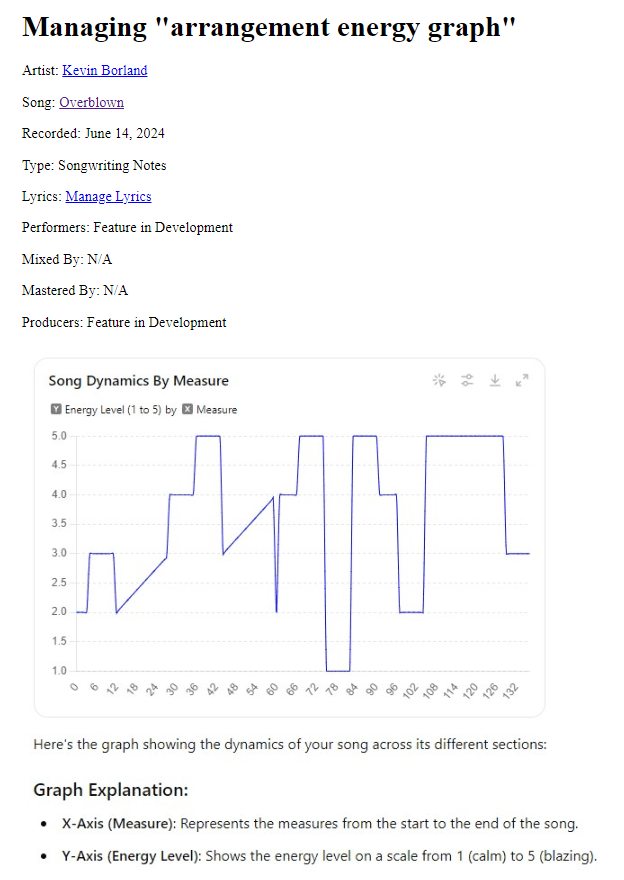
The screenshot above is from the vault database, which not only stores the song’s arrangement and production information but also serves as a reference for later stages of development. I was pleased with the overall structure, which featured a building intensity, a breakdown section about two-thirds into the song, followed by a period of dynamic variety, and ending with an extended high-energy phase leading into the outro.
The diagonal lines in the diagram represent the song’s two verses, designed to build in intensity. The second verse picks up where the first verse leaves off but is punctuated by a high-energy (level 4) pre-chorus and an even higher energy (level 5) chorus. Whether my performance of the instruments met this dynamic plan is a different story, but the crucial point is that we established a roadmap for the song’s energy.
The next task was to import this information into my DAW project file. This step was straightforward: I asked ChatGPT to analyze our discussion and determine at which measure numbers to insert markers in Cakewalk’s marker view, along with the appropriate names for each marker. With just one prompt, I had a clear list of markers to add. It took about five minutes to manually insert them, and then I showed ChatGPT a screenshot of the markers in place, asking it to verify my work.
Learning and Performing the Basic Melodies
With the song structure and dynamics clearly mapped out, the next step was to sit down at my keyboard and learn to perform the basic melodies of the song. This phase is where the theoretical plan begins to take shape in practical terms. Many of the melodies were already composed in my driving song ideas videos, but I also created a few new melodic sections that were described in the song structure chart and energy level diagrams but not present in the original six cell phone videos.
This artistic creation step is one of my favorite parts of the music process. I worked on it mostly by myself, only consulting ChatGPT a couple of times to discuss how the chord progressions I was composing fit into the song and whether they were original enough to be included. I found ChatGPT’s feedback was valuable, and generally took its advice, without delegating my job as a musician to create the song’s melodies and hooks.
Transferring the keyboard parts to a Cakewalk MIDI track was straightforward. I chose a Rhodes organ track for its warm, vintage sound that I envisioned for the pre-chorus sections. I figured I could switch some of the other sections to different MIDI instruments later as the arrangement developed.
Composing the percussion parts was similarly straightforward, guided by the song structure chart and energy diagram. While I initially planned a “march” beat on the snare for the breakdown section, I ultimately opted for a “Motown” beat after experimenting on my drum synth for a few hours.
Composing the Bass Line
The next task in our production journey was to add a synth bass guitar track to “Overblown.” After experimenting with different synth presets, I found one that perfectly matched the beat and overall style of the song. Composing a bass line involves not only a good grasp of music theory but also a keen sense of rhythm to interact effectively with the drum beats in each section.
For the verses, which feature simpler melodies, I wanted the bass line to add interest and complexity through its rhythms and patterns. This is where ChatGPT’s music theory analysis was invaluable. By examining my chord progressions, ChatGPT identified the key and modes—E minor and D Mixolydian—suggesting appropriate scales and helping me select notes that would complement the song’s harmonic structure.
While ChatGPT provided the theoretical framework, I focused on choosing the individual notes and aligning the bass riffs with the rhythm of the drum beats. The aim was to create a bass line that was both engaging and cohesive, supporting the song without overpowering other elements.
We worked as a team, with ChatGPT providing insights into scales and modes, and me crafting the actual riffs and rhythms. This collaborative approach allowed us to track the complete bass line in Cakewalk in under an hour, from composition to performance. The result was a dynamic and intricate bass line that added depth and movement to the track, enhancing the overall musical experience.
Writing and Recording the Lyrics
By around 1:00 AM, we had a solid foundation with the bass and percussion tracks laid down. Given that recording guitars requires using an amplifier at a relatively high volume, I decided to save that for Saturday morning to avoid disturbing the neighbors. Instead, we focused the next three hours on writing the lyrics and recording the vocals.
We began by discussing the concept and inspiration behind “Overblown.” I shared the existing lyrics I had developed in the car, which included the chorus and draft lyrics for the pre-choruses. For the choruses, I recorded the vocals on my own without AI assistance, sticking closely to the ideas I had already formulated.
For the pre-choruses, however, I turned to ChatGPT for help. We worked together to create variations of my initial draft for different sections, ensuring that each pre-chorus had its unique flavor while maintaining thematic coherence. ChatGPT acted as a sort of smart thesaurus, helping me refine lines where the syllabic count didn’t align perfectly with the song’s rhythm.
This collaboration resulted in more nuanced and dynamically varied pre-choruses. The AI’s suggestions enriched the lyrics with subtle differences, making each section distinct. Additionally, the process was far more efficient than if I had worked through these revisions alone, highlighting one of the key benefits of integrating AI into my workflow: significant time savings without compromising on creativity.
Crafting the Verses
The process of writing the verses for “Overblown” involved a much more extensive collaboration with AI. The primary role of ChatGPT during this stage was in the brainstorming process, where we exchanged a plethora of ideas, concepts, themes, and potential lyric lines.
We began by discussing how each verse would be structured into two parts, each representing its own scene and analogy. Through our brainstorming, we explored various analogies, ultimately settling on themes such as an earthquake, a storm, a police chase, and a shadowy figure symbolizing the “grudge” held by the female protagonist. These metaphors were crucial in shaping the narrative and emotional landscape of the song.
For example, the idea of setting the car chase on Rosecrans in Los Angeles not only enriched the lyrics with vivid imagery but also provided a concrete setting that would not only tie in to the earthquake theme, but later influence the visual storyboarding for the song’s video. ChatGPT’s suggestions and our discussions significantly influenced the development of these scenes and analogies.
While I ultimately chose most of the specific words in the verses, the influence of our conversations and the ideas proposed by ChatGPT were instrumental. The AI helped refine the scenes and plot, ensuring that the lyrics were not only coherent but also resonant with the song’s overall theme and mood.
As a side note, this brainstorming and collaboration process mirrors how I am using AI to assist me in crafting these blog posts. Just as the verses of a song aim to tell a story—albeit in a more artistic manner—the blog posts seek to narrate a story that, while technical, benefits greatly from a dynamic exchange of ideas between human and AI co-authors.
Saturday Afternoon
As someone who has been playing guitar for about 35 years, composing, arranging, performing, and recording the guitar parts was a straightforward task for me. I completed all the guitar tracks in about an hour and a half after waking up around noon (we were up late the previous night).
Unfortunately, I broke a string on my Ibanez, which I usually use for lead parts. In the interest of time, I used my uncle’s Fender Jaguar for all four guitar tracks on the recording. Despite the change in instruments, the recording session went smoothly.
After laying down the guitar tracks, I listened back and made some adjustments. I decided to convert some of the organ parts to piano, which added a different texture to the arrangement. I also added a string section synth over the chorus to match our energy diagram. For the intro section, I replaced the organ with bells, played an octave higher than the original organ take.
By about 2:30 PM, I had a “full-band” demo version of the song. I use quotes because, while I performed all the instruments myself, the arrangement included all the elements of a full-band setup.
Creating A Storyboard Music Video
While the song hasn’t yet undergone proper mixing and mastering, I wanted to share its current form with the readers of this blog. After dinner, I decided to enlist ChatGPT’s help to create a storyboard music video by generating DALL-E image prompts for each 2-measure segment of the song.
ChatGPT and I worked together to generate prompts for DALL-E, an AI image generation tool. Our goal was to produce images that matched each 2-measure segment of the song. We brainstormed various scenes and themes that aligned with the lyrics and the mood of each part of the song. For instance, we depicted the verses with visuals of an earthquake and a police chase—elements we had discussed the previous night to convey the turmoil and tension in the song’s story.
Using the energy diagram as a guide, we aimed to ensure that the intensity of each image correlated with the energy level of the corresponding section of the song. This helped maintain a visual consistency that mirrored the dynamic progression of the music.
Once we had a series of AI-generated images, I used HitFilm Express to compile them into a slideshow video. Finally, ChatGPT and I co-authored this blog post.
Final Thoughts
The workflow described above has proven to be effective for me, and I’m excited to explore even more ways to integrate AI into my music production process with each new song. While I admittedly wouldn’t count “Overblown” among my best songs, it represents a significant milestone in how quickly and efficiently I can create. In total, I spent about 24 hours composing, arranging, and recording it (plus the brief moments in February and April when I captured my initial ideas on my phone).
 My AI Lifestyle
Leave a comment